Persistent Full Duplex Connection via Web Socket
RIA is considered one of the most distinctive features of the modern Web, reflecting a trend where web applications grow to resemble desktop applications. The approach, however, has limits. The overwhelming majority of “rich” web applications are still built on the request-response model. Events on the client side can reach the server, but not vice versa. To build something as simple as a chat, you have to use tricks. These techniques for emulating bi-directional connections are collectively called Comet, a term coined by Alex Russell of Dojo.
According to cometdaily.com, the known tricks include:
- Long polling: the server does not respond to the XHR request immediately, but only when an event addressed to the requesting source enters the queue. For example, a client requests a chat window update, but the server only responds when the relevant DB state changes.
- Forever frame: creates an iframe in which the server continuously appends events as they arrive.
- Script tags: dynamically generated JS blocks that allow cross-domain communication.
- ActiveXObject(“htmlfile”): an IE-specific method using ActiveX.
- JSONRequest object: opens a bi-directional channel using two simultaneous requests, one for sending and one for receiving.
Flash embeddings and Java applets can also be used, and there is even something as creative as Forever GIF.
A few higher-level solutions worth noting:
- Bayeux protocol: allows event exchange on a one-client-to-many-servers and one-server-to-many-clients model. Used in the CometD project.
- BOSH protocol: emulates a duplex data stream between browser and server using two synchronous HTTP connections.
- APE (Ajax Push Engine): a lightweight open source push server, compatible with MooTools, Dojo, and jQuery.
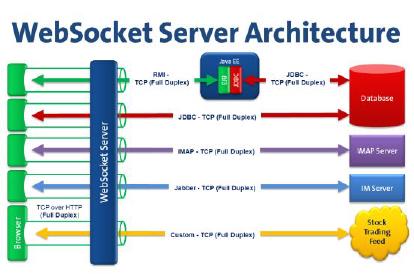
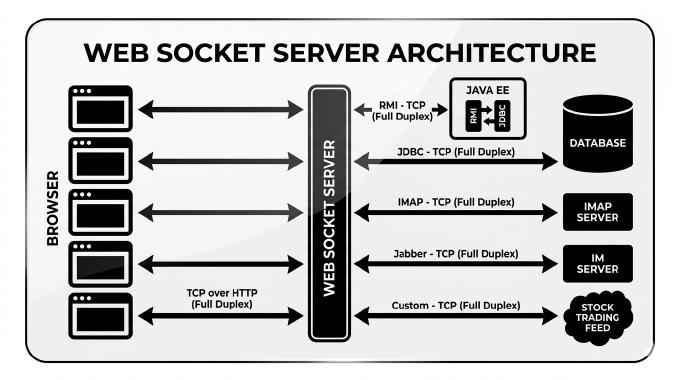
All of these are workarounds. The HTML5 working group addressed this directly: the HTML5 standard includes Web Sockets. It tolerates firewalls and routers, supports cross-domain communication, integrates with HTTP load balancers, accepts binary data, and works over secure connections. The API is minimal:
ws = new WebSocket("ws://site.com/demo");
// Callbacks
// Invoked when the connection is created
ws.onopen = function() { alert("Connection opened...") };
// Invoked when the connection is closed
ws.onclose = function() { alert("Connection closed...") };
// Invoked when the browser receives any data by the channel
ws.onmessage = function(e) { console.log(e.data); };
// Sends a message in the channel
ws.send('message')
At the time of writing, only Google Chrome supports Web Sockets (since version 4.0.249.0). For other browsers you need a facade that uses the native interface when WebSocket support is detected and falls back to a Comet technique otherwise. Kaazing WebSocket Gateway is one option. Another is Orbited combined with io.js, which supports WebSockets alongside protocols like AMQP, IMAP, IRC, LDAP, SMTP, SSH, STOMP, Telnet, and XMPP, proxied via Python on the server side.
The most popular server-side solution at the time is node.js, but for a simple introduction I used WebSocket.js, a small JS library that bridges via a Flash object.
To set up a test environment you also need a Web Socket server. I used Jetty, which has supported WebSockets since version 7.0.1 (still marked almost stable, but fine for testing). If your backend is PHP, phpwebsocket and Phpwebsockets exist, though both are experimental.
Jetty installs without issues, but WebSocket.js can trip you up because of Adobe’s cross-domain policy for Flash. You need to allow Flash to open a socket on your server. The simplest fix is to run a micro-server on port 843 that responds to the policy request with the appropriate XML, as described in this article. The article includes a sample Perl server you can copy and run. I wrote my own variant based on this example.
By default you get broadcasting: anything sent over WebSocket reaches all connected clients. You can open two browsers (for example Firefox and Chrome, one using the bridge and the other native WebSockets) and sending a message via channel.send will trigger onmessage in both. That alone is enough to build a Google Wave-style chat that shows each participant’s typing in real time. Just include an addressee ID list in the data and filter on the receiving end:
var clientID = 1;
ws.send({
	senderID:  clientID,
	receivers: [2,3,4],
	payload: {
		message: 'a message'
	}
});

ws.onmessage = function(e) {
	if (clientID in e.data.receivers) {
		output.append(e.data.payload.message);
	}
};
Going further, you need the ability to fire events from the server side. If a new user joins the site, the server should notify clients so they can update the online list. With various events from different sources targeting different clients, a reliable dispatch system becomes necessary. A simple but elegant fit is STOMP, a protocol with just a handful of commands (SEND, SUBSCRIBE, UNSUBSCRIBE, BEGIN, COMMIT, ABORT, ACK, DISCONNECT) for client-broker communication. Zend Queue includes a STOMP adapter. Message brokers can be built on Apache ActiveMQ or RabbitMQ.
Another option is AMQP. Since Jetty runs in a JBoss container, you would need a separate container as the AMQP broker, such as ZeroMQ or Qpid.