How to Make AJAX Read between the Lines
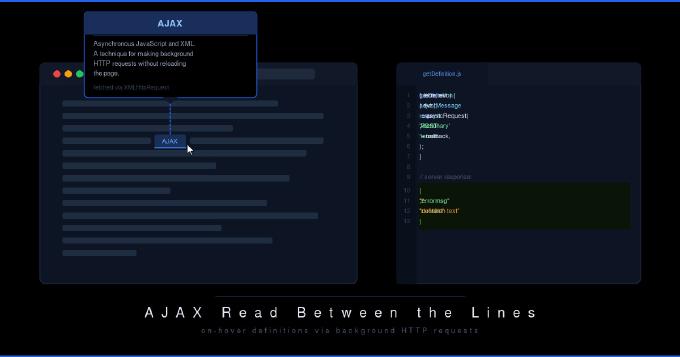
Technical sites often include terms that readers may not know. The old approach was to link each term to a definition popup, but that requires a click, a load, and another click to close. With AJAX, the definition appears the moment the cursor hovers over the term and disappears when it moves away. No extra page weight: JavaScript fetches the definition from an external source on demand.
The same technique has broader uses. The double-underlined links on sites like hotscripts.com and devarticles.com work this way: hovering triggers a context-dependent ad powered by Vibrant Media’s IntelliTXT engine (www.vibrantmedia.com). That is in-text advertising.
News portals use the same pattern. The front page shows only headlines, and hovering reveals a short summary. This lets the page surface far more stories without becoming unwieldy.

Here is how to build contextual help with AJAX. The same code structure works for news preview popups or in-text advertising.
The popup is a hidden <div> that becomes visible on demand. Wrapping each technical term in an inline element (a <span>, for example) lets you attach onmouseover and onmouseout events. On hover, a JavaScript function fetches the definition, fills the popup, and shows it. On mouseout, another function hides it.
getDefinition takes the term as its first argument, used in the AJAX request, and the event object as its second, needed to position the popup under the cursor in Gecko-based browsers. hideMessage takes no arguments.
adjustMessage positions the popup relative to the cursor and shows a “Loading…” placeholder while the request is in flight:
function adjustMessage(evt) {
	MessageObj = document.getElementById('InstantMessage');
	if (isThisMozilla) event = evt;
	var rightedge = document.body.clientWidth - event.clientX;
	var bottomedge = document.body.clientHeight - event.clientY;
	if (rightedge < MessageObj.offsetWidth)
		MessageObj.style.left = document.body.scrollLeft + event.clientX - MessageObj.offsetWidth;
	else
		MessageObj.style.left = document.body.scrollLeft + event.clientX;
	if (bottomedge < MessageObj.offsetHeight)
		MessageObj.style.top = document.body.scrollTop + event.clientY - MessageObj.offsetHeight;
	else
		MessageObj.style.top = document.body.scrollTop + event.clientY;

	MessageObj.innerHTML = 'Loading...';
	MessageObj.style.visibility = "visible";
}
Next, the actual AJAX request. You can use any XHR wrapper; the example below uses the Yahoo UI Library:
function getDefinition(term, evt) {
	adjustMessage(evt);
	var request = YAHOO.util.Connect.asyncRequest('POST', 'http://controller_address', callback, 'term=' + term);
}
Now for the server side. The controller receives the term via POST and returns a definition. The language does not matter. Three steps:
- connect to the database
- run an SQL query to fetch the definition
- return the result as JSON:
{
  "errormsg": "error code, or empty string on success",
  "content": "definition text"
}
JavaScript parses this natively. The YUI callback handlers look like this:
var handleSuccess = function(o) {
	if (o.responseText !== undefined) {
		showMessage(o.responseText);
	}
};

var handleFailure = function(o) {
	if (o.responseText !== undefined) {
		showMessage("Connection Error");
	}
};

var callback = {
	success: handleSuccess,
	failure: handleFailure,
	argument: ['foo', 'bar']
};
showMessage parses the JSON and injects the definition text into the popup:
function showMessage(json) {
	var respondStructure = eval('(' + json + ')');
	MessageObj.innerHTML = respondStructure.content;
	return false;
}
Hiding the popup is straightforward:
function hideMessage() {
	var MessageObj = document.getElementById('InstantMessage');
	MessageObj.style.visibility = "hidden";
}
The implementation works cleanly in IE. Firefox may show a flicker due to its handling of onmouseover/onmouseout events; adding a short delay flag to both handlers fixes it.
The full source is available at phpclasses.org.