Interactive Grid with Your Own Hands
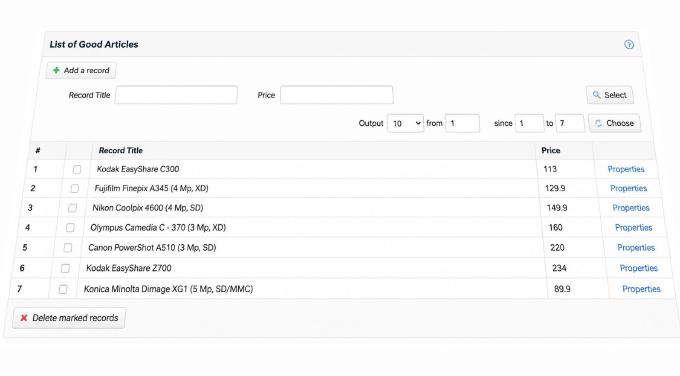
Users coming from desktop apps tend to find web application interfaces frustrating. With AJAX, there is no good reason for that anymore. This article focuses on one of the most common UI elements: the data grid. Nearly every web application needs to manage tabular data. PhpMyAdmin’s record manager is a classic example in this space - functional, but it reloads the page on every operation and can lose unsaved state. A proper grid should let users sort by fields, filter records, paginate, and select ranges, all without refreshing the page.
The foundation of AJAX is XMLHttpRequest, a JavaScript API for making asynchronous requests to a server without reloading the page. When a user clicks a sort header, JavaScript sends a request to the server script. The server reads the parameters, fetches the sorted records, and responds. JavaScript receives the response and updates only the table area. The rest of the page stays untouched.

XMLHttpRequest is straightforward enough on its own, but a library helps. The YUI toolkit’s Connector component simplifies this considerably. A single call to YAHOO.util.Connect.asyncRequest('POST', sUrl, callback, postData) sends a POST request to any URL and handles the response via the callback you provide.
In the HTML, define the grid structure but leave the dynamic sections (the record list, the count indicator) as empty containers with unique IDs. JavaScript will fill these after each server response. The response handlers look like this:
var handleSuccess = function(o){
            if(o.responseText !== undefined){
                        document.getElementById(divName).innerHTML =
decorateList(o.responseText);
            }
};

var handleFailure = function(o){
            if(o.responseText !== undefined){
                        document.getElementById(divName).innerHTML =
'Server Error';
            }
};

var callback =
{
  success:handleSuccess,
  failure:handleFailure,
  argument:['foo','bar']
};

</font>
What does the server send back? The simplest option is raw HTML for the updated table, but that mixes data with presentation. Any layout change then requires editing server-side code, which clutters the business logic. The classic alternative is XML, but that requires parsing on the client or delegating to XSLT (covered in the “AJAX: Getting Started” article). A better choice is JSON. It transfers less data, avoids encoding problems with special characters, and JavaScript can consume it directly without any parsing step.
With that in place, you define the parameters for each user action and handle them in the server script. When the user clicks “Show,” for example, JavaScript reads the offset and page size from the input fields, sends them to the server, the server builds the SQL query and returns the results as JSON, and JavaScript renders the rows.

This opens up a lot of room. You can auto-retry requests on network failure, show meaningful progress indicators, and make filters live - sorting the list as the user types rather than waiting for a button click. The approach scales as far as you want to take it.
You can download the code archive with all files needed to run the working examples from this article.