React Design Patterns: A Practical Reference
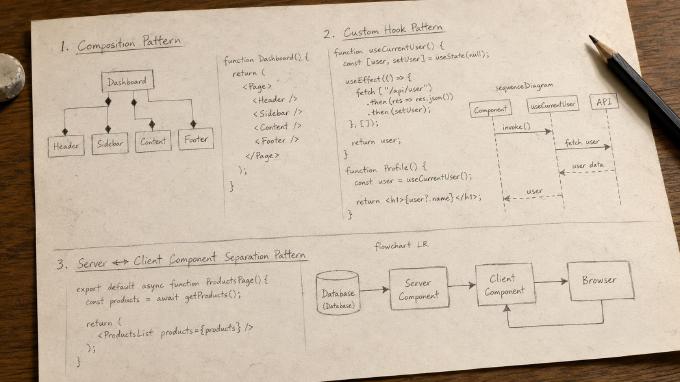
GoF design patterns gave OOP developers a shared vocabulary for recurring structural problems. SOLID gave them principles for evaluating design decisions. React doesn’t fit neatly into either framework, but after several years of widespread adoption, its own set of idiomatic patterns has emerged.
These aren’t best practices in the vague sense. They’re concrete, named solutions to specific problems that come up repeatedly when building React applications: how to share logic without duplicating it, how to avoid prop drilling, how to split server and client concerns, how to build flexible component APIs.
This article covers six of the most important ones. Each pattern includes a real-world analogy, a code example, and a diagram to make the concept as concrete as possible.
Contents
- Composition Pattern
- Custom Hook Pattern
- Provider Pattern (Context / Dependency Injection)
- Compound Components Pattern
- Server ↔ Client Component Separation Pattern
- Suspense Pattern
1. Composition Pattern
Concept
Composition is the process of building complex UI elements by combining smaller, reusable components. Rather than inheriting behavior from parent classes, React encourages developers to assemble interfaces from independent pieces.
This principle is often summarized as:
Favor composition over inheritance.
Composition is arguably the most important design pattern in React because the entire component model is built around it.
Real-World Analogy
Think of building a house: you don’t create a new wall by inheriting from an existing one. Instead, you assemble from rooms, doors, windows, and furniture. Each piece has a clear responsibility. React components work the same way.
In Practice
Dashboard pages combine independent elements - Sidebar, Header, Statistics cards, Charts, Footer - each implemented separately and composed into the final page. This improves reusability, testability, and maintainability.
JavaScript Example
function Dashboard() {
  return (
    <Page>
      <Header />
      <Sidebar />
      <Content />
      <Footer />
    </Page>
  );
}
The Dashboard component doesn’t implement everything itself.
Instead, it orchestrates smaller components.
UML Diagram

Key Takeaways
- React is fundamentally built around composition.
- Components remain small and focused.
- Complex interfaces emerge by combining simple building blocks.
- Composition replaces most traditional inheritance-based designs.
2. Custom Hook Pattern
Concept
A Custom Hook is a mechanism for extracting reusable stateful logic into a standalone function.
Before hooks, developers often relied on Higher-Order Components (HOCs) and Render Props to share behavior between components. Hooks simplified this dramatically by allowing logic to be reused directly through function calls.
A custom hook encapsulates:
- State
- Side effects
- Data fetching
- Event handling
- Business rules
without coupling them to a specific UI.
Real-World Analogy
Imagine a coffee machine: many employees use the same one without understanding how it heats water, grinds beans, or manages pressure. They simply press a button and get coffee. A custom hook works the same way - components consume behavior without worrying about its internal implementation.
In Practice
Common custom hooks (Authentication, API requests, Form handling, Theme management, Browser event listeners) allow multiple components to reuse identical logic while maintaining a clean separation of concerns.
JavaScript Example
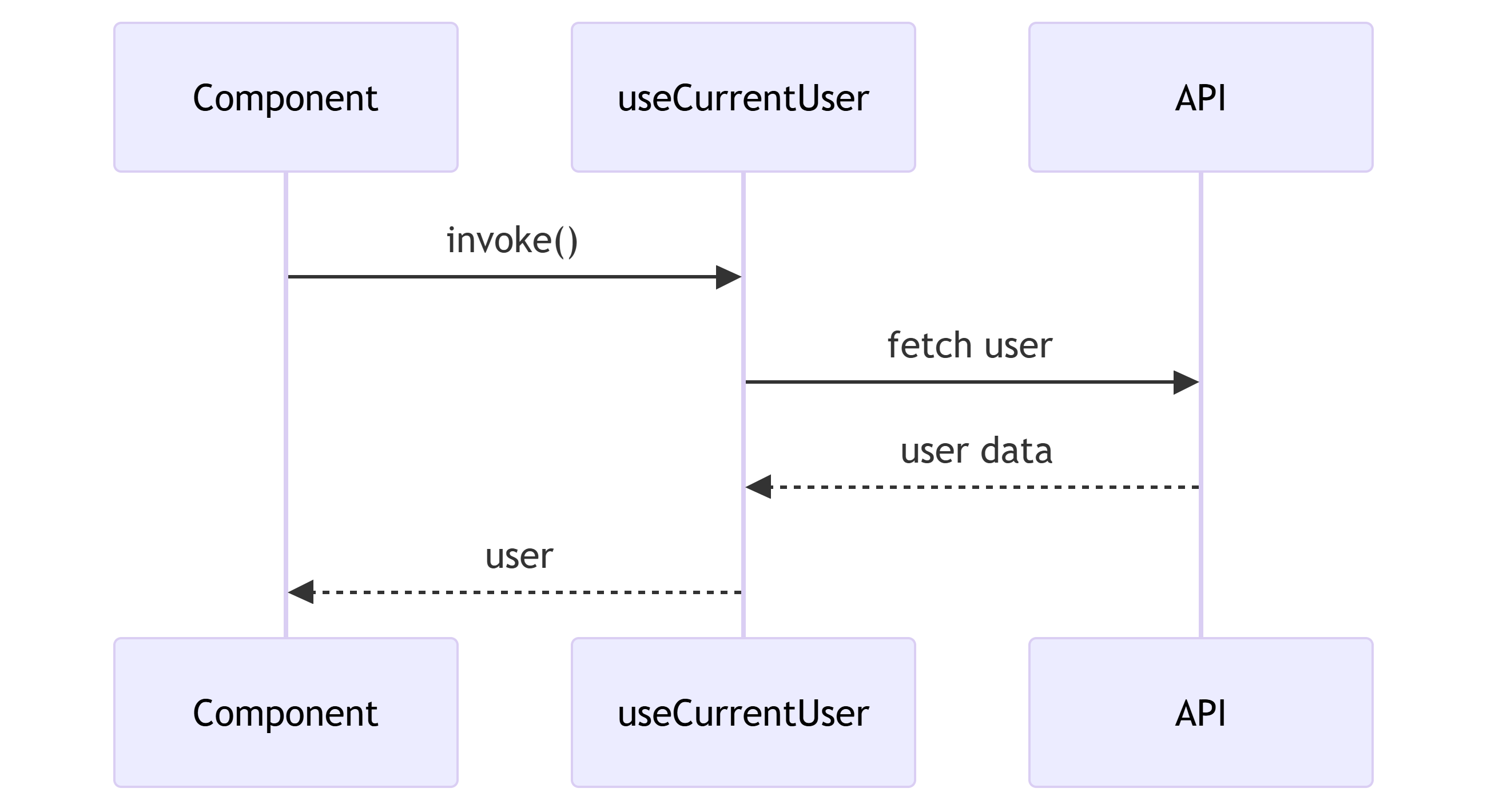
function useCurrentUser() {
  const [user, setUser] = useState(null);

  useEffect(() => {
    fetch("/api/user")
      .then(res => res.json())
      .then(setUser);
  }, []);

  return user;
}

function Profile() {
  const user = useCurrentUser();

  return <h1>{user?.name}</h1>;
}
UML Diagram
Key Takeaways
- Extracts reusable behavior.
- Keeps components focused on rendering.
- Replaces much of the need for HOCs and Render Props.
- Encourages separation between UI and business logic.
3. Provider Pattern (Context / Dependency Injection)
Concept
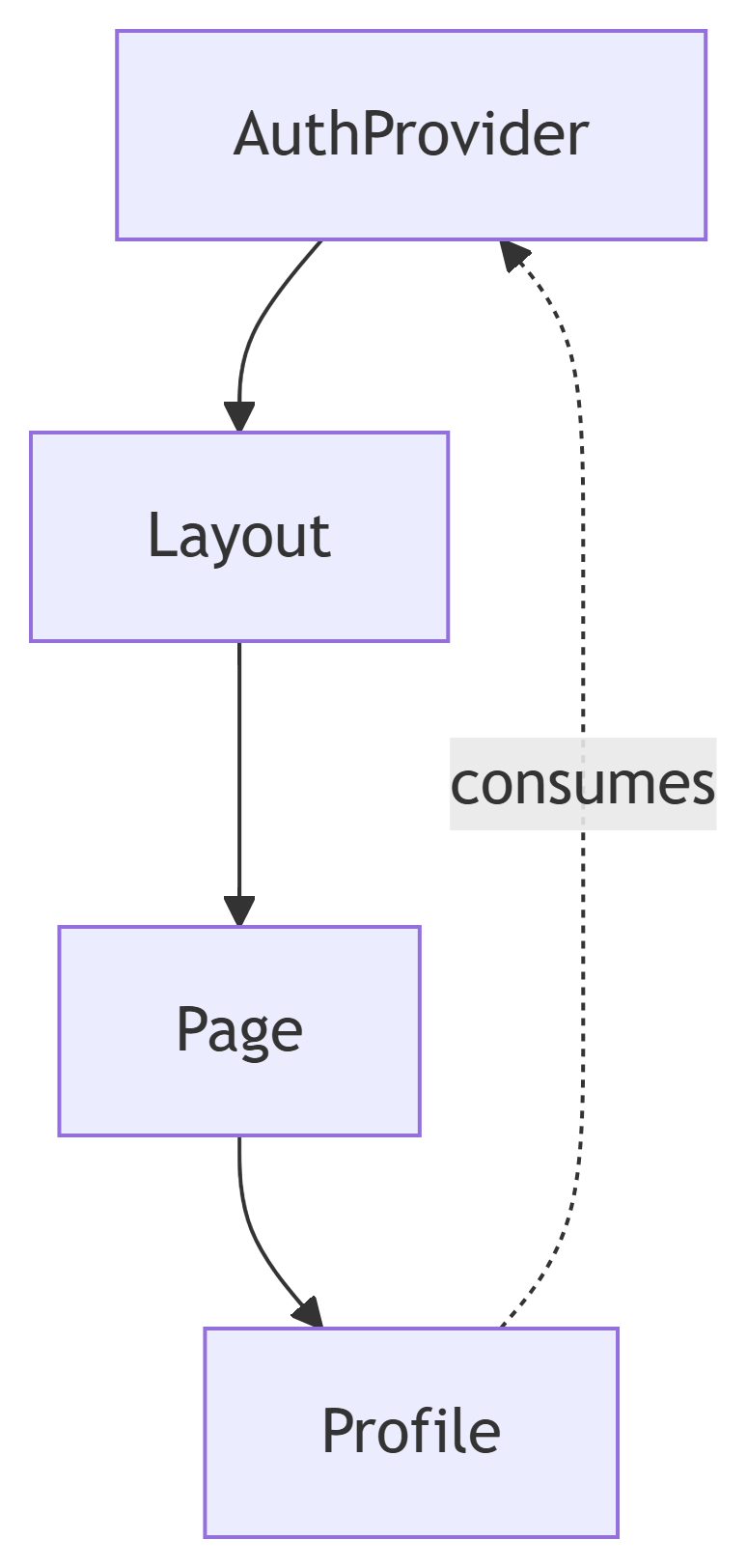
The Provider Pattern allows data and services to be shared across a component tree without manually passing props through every level.
React implements this through Context Providers.
A provider acts similarly to a Dependency Injection container by making dependencies available to descendants.
Real-World Analogy
Consider a building with a central power system: every room receives electricity without individual generators and doesn’t know where it comes from. A Provider supplies application-wide resources in exactly the same way.
In Practice
Providers manage Authentication, Theme settings, Localization, Feature flags, Analytics, and Shared state. Instead of passing data through multiple component layers, components access it directly from the nearest provider.
JavaScript Example
const AuthContext = createContext();

function AuthProvider({ children }) {
  const [user] = useState({
    name: "John"
  });

  return (
    <AuthContext.Provider value={user}>
      {children}
    </AuthContext.Provider>
  );
}

function Profile() {
  const user = useContext(AuthContext);

  return <h1>{user.name}</h1>;
}
UML Diagram
Key Takeaways
- Eliminates excessive prop drilling.
- Centralizes shared application data.
- Similar to Dependency Injection.
- Ideal for cross-cutting concerns.
4. Compound Components Pattern
Concept
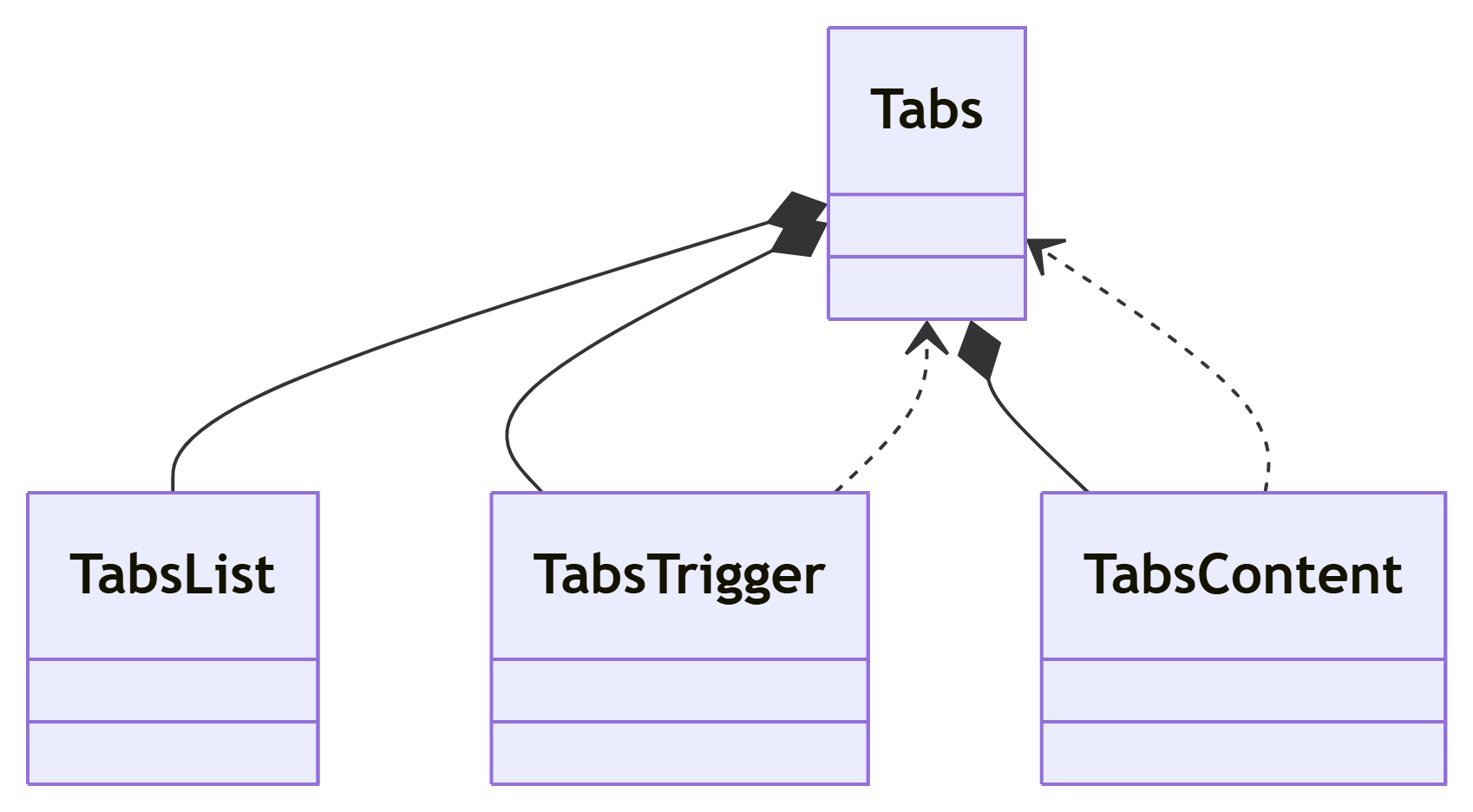
The Compound Components Pattern allows multiple components to work together as a coordinated unit while maintaining a natural and expressive API.
The parent component manages shared state and behavior, while child components expose specialized functionality.
This pattern creates highly flexible UI primitives.
Real-World Analogy
Think of a restaurant: Reception, Dining area, Kitchen, and Waiters each perform different tasks under a shared system. Individually, the pieces have limited value. Together, they provide a complete experience.
In Practice
Many modern component libraries use this pattern. The consumer assembles pieces like <Tabs.List />, <Tabs.Trigger />, and <Tabs.Content /> while the underlying implementation coordinates behavior.
JavaScript Example
<Tabs>
  <Tabs.List>
    <Tabs.Trigger value="profile">
      Profile
    </Tabs.Trigger>

    <Tabs.Trigger value="settings">
      Settings
    </Tabs.Trigger>
  </Tabs.List>

  <Tabs.Content value="profile">
    Profile Content
  </Tabs.Content>

  <Tabs.Content value="settings">
    Settings Content
  </Tabs.Content>
</Tabs>
UML Diagram
Key Takeaways
- Creates expressive APIs.
- Encourages component collaboration.
- Hides complexity behind a clean interface.
- Widely used in modern design systems.
5. Server ↔ Client Component Separation Pattern
Concept
Server Components and Client Components have different responsibilities.
Server Components execute on the server and focus on:
- Data fetching
- Database access
- Authentication
- Caching
Client Components execute in the browser and focus on:
- State
- User interactions
- Event handlers
- Browser APIs
The pattern promotes a clear separation between business logic and interactivity.
Real-World Analogy
Imagine a restaurant: the kitchen prepares meals, the dining area serves customers. The kitchen doesn’t take orders; the dining area doesn’t cook. Each side focuses on its own responsibility.
In Practice
Next.js App Router embraces this architecture by default. Pages and layouts are Server Components unless explicitly marked as client-side.
JavaScript Example
Server Component
export default async function ProductsPage() {
  const products = await getProducts();

  return (
    <ProductsList products={products} />
  );
}
Client Component
"use client";

export function ProductFilter() {
  const [search, setSearch] = useState("");

  return (
    <input
      value={search}
      onChange={e => setSearch(e.target.value)}
    />
  );
}
UML Diagram

Key Takeaways
- Reduces JavaScript sent to the browser.
- Improves performance.
- Clearly separates responsibilities.
- Fundamental to modern Next.js architecture.
6. Suspense Pattern
Concept
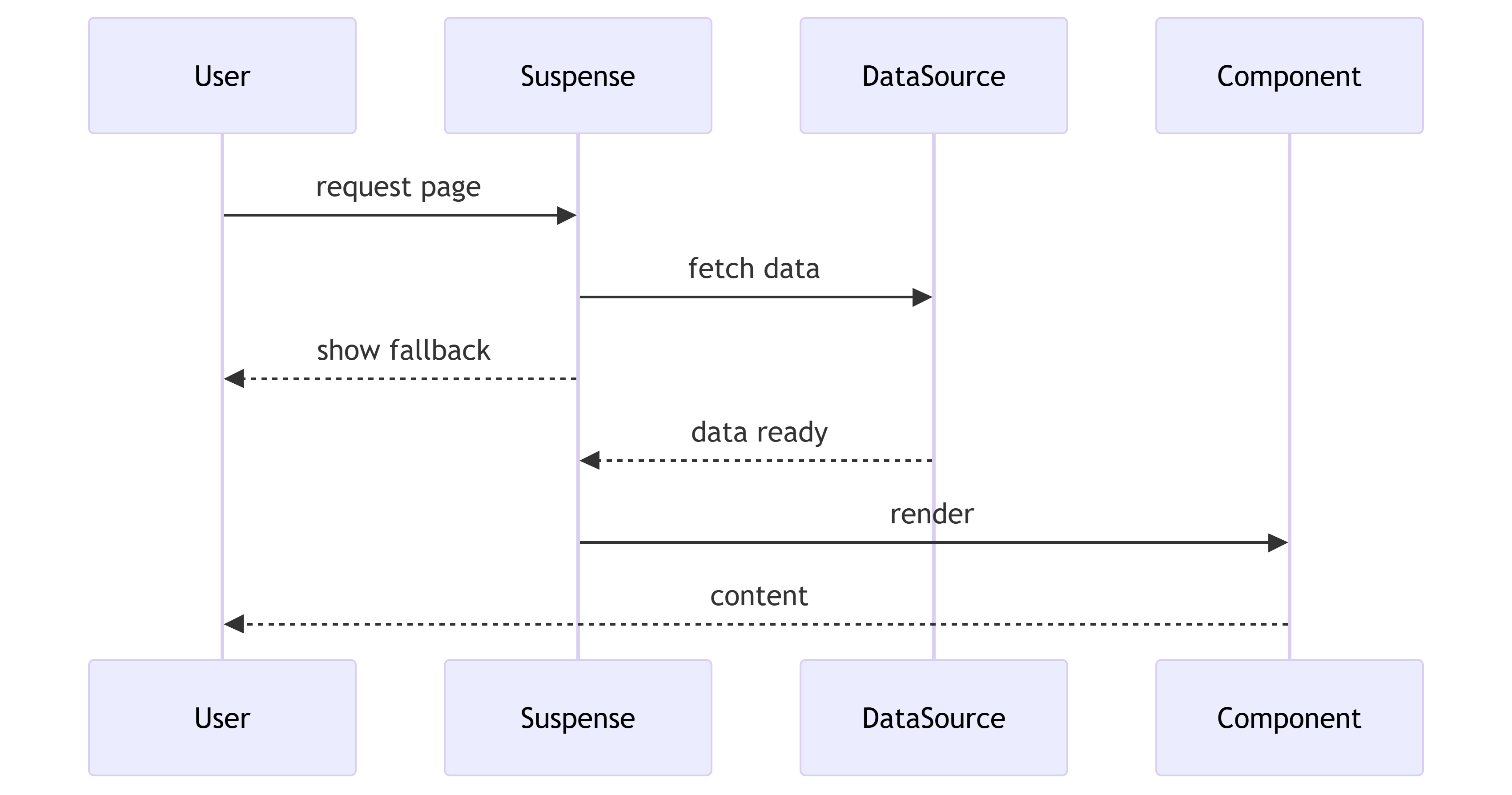
Suspense allows React to pause rendering while asynchronous operations complete and display fallback content meanwhile.
Instead of blocking the entire page, React progressively reveals content as it becomes available.
This creates smoother user experiences and enables streaming interfaces.
Real-World Analogy
Imagine arriving at a restaurant: rather than making customers wait until every dish is prepared, the restaurant serves bread and drinks immediately. Additional dishes arrive when ready. Suspense applies the same principle to UI rendering.
In Practice
Suspense is frequently used for Data fetching, Lazy-loaded components, Streaming Server Components, and Progressive rendering. Users receive meaningful feedback immediately instead of staring at a blank page.
JavaScript Example
<Suspense fallback={<Spinner />}>
  <Products />
</Suspense>
UML Diagram
Key Takeaways
- Improves perceived performance.
- Enables progressive rendering.
- Supports streaming experiences.
- Essential for modern React applications.
Putting It Together
These six patterns don’t exist in isolation. A typical Next.js page uses most of them at once.
Server/Client Separation handles where data fetching happens. Suspense covers the loading state while that data arrives. The Provider Pattern supplies auth context or theme without prop drilling. Composition assembles the layout from focused pieces. Custom Hooks extract the interactive logic. Compound Components expose a clean API for complex UI elements.
Understanding these patterns by name speeds up architectural decisions and makes code reviews more precise. When a reviewer says “extract that into a custom hook” or “reach for compound components here,” the intent is unambiguous.
The patterns in this article aren’t the only ones in React, but they’re the ones you’ll encounter most often and the ones worth reaching for first.