
Contents
E2E tests are notoriously easy to write badly. They come out slow, flaky and full of copy-pasted locators, and the suite gets a bit slower with every release without anyone noticing. Here’s how I keep Playwright tests fast and maintainable: fixtures for readability, tests for authentication flows and data tables, checks for responsive layout and visual regressions, and a performance budget.
What E2E tests are for#
An end-to-end test walks through a user journey from start to finish, the way a real user would, and catches what breaks between the systems involved. You can slice it two ways. Horizontal tests follow a complete workflow across the application. Vertical tests take one critical feature and go down through its layers (UI, API, database).
In practice, a decent E2E suite covers user journeys, the behavior of UI components, whether API calls work, whether pages load within acceptable limits, how the app behaves in Chrome, Firefox, Safari and Edge and on different devices, and what happens with invalid input, wrong user actions and server failures.
Why Playwright?#
I’ve worked with Selenium, Cypress and Puppeteer, and ended up with Playwright. I was fond of Puppeteer, but it’s a browser automation library, not a test tool. Playwright comes from the same people: the team that built Puppeteer at Google moved to Microsoft and released Playwright in 2020, this time with testing in mind. It brings:
- A built-in test runner with plenty of web-specific assertions.
- Auto-waiting, so actions wait until an element is actionable.
- All three modern engines (Chromium, Firefox, WebKit) and mobile emulation.
- Debugging tools: Codegen, Inspector and Trace Viewer.
Auto-waiting isn’t flawless though. Now and then it fails in ways that are hard to debug. We’ll get to the typical cases below.
Functional testing with Playwright#
I’ll use this demo app for the examples, starting with its login flow.

Setting up Playwright#
Generate a boilerplate project:
npm init playwright@latest
You can run that in your development environment or inside a Docker container:
docker run --network=host -it --rm --mount type=bind,source=/var/www/E2E,target=/var/www -w /var/www --ipc=host mcr.microsoft.com/playwright:v1.51.1-noble /bin/bash
With this command the test projects live in /var/www/E2E. You get a playwright.config.js in the root, a test folder with an initial suite (example.spec.js) and a tests-examples folder with sample tests for a TODO MVC app, which we can delete.
Keeping tests clean#
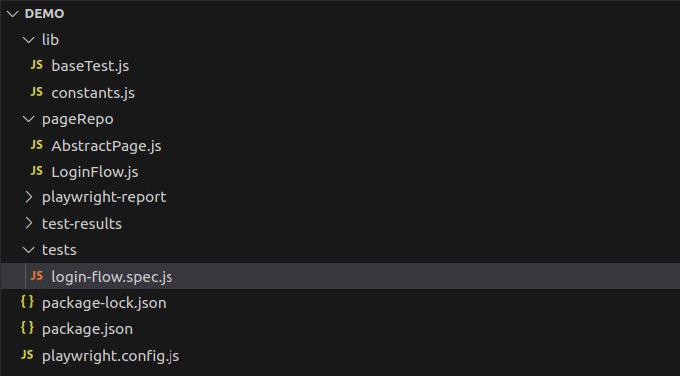
To keep the tests maintainable, I separate locators and functional logic, grouped per scope (usually a page), from the test logic, which is mostly assertions. First, the global constants:
lib/constants.js
import { join } from "path";

export const BASE_URL = process.env.BASE_URL;
export const RES_PATH = join( __dirname, "..", "test-results" );

export const saveAs = ( subPath, fullPage = false ) => {
    subPath = subPath.replace( /[^a-zA-Z0-9-_]/g, "-" );
    return {
        path: join( RES_PATH, subPath + ".png" ),
        fullPage,
        timeout: 3000
    };
};
export const TEST_LOGIN_EMAIL = "[email protected]";
export const TEST_LOGIN_PASSWORD = "Password1";

export const VIEWPORTS = {
    WUXGA: {
      width: 1920,
      height: 1200,
    },
    IPAD_MINI: {
        width: 768,
        height: 1024
    },
    IPHONE8: {
        width: 375,
        height: 667
    }
};
BASE_URL comes from the environment. VIEWPORTS gives the screen sizes names, so tests say IPAD_MINI instead of 768x1024. TEST_LOGIN_EMAIL and TEST_LOGIN_PASSWORD are the credentials for the login flow. saveAs() builds screenshot options and turns a plain-text description into a file name under test-results/, so “Login flow valid credentials” becomes Login-flow-valid-credentials.png.
Page objects as fixtures#
For readability and reuse, we extend Playwright’s test with fixtures and keep locators and logic in page objects.
Abstract page#
pageRepo/AbstractPage.js
import { BASE_URL, VIEWPORTS } from "../lib/constants";

export class AbstractPage {

	constructor( page ) {
		this.page = page;
    }

    async openPage({ viewport, path } = { viewport: null, path: null }) {
        viewport = viewport ?? VIEWPORTS.WUXGA;
        this.viewport = viewport;
        await this.page.setViewportSize( viewport );
        await this.page.goto( BASE_URL + ( path ?? this.baseUrl ));
    }
}
openPage() sets the viewport on every call (WUXGA unless told otherwise) and opens the page by the baseUrl each page object defines, e.g. /login, so tests don’t repeat URLs.
Login page#
pageRepo/LoginFlow.js
import { AbstractPage } from "./AbstractPage";
export default class LoginFlow extends AbstractPage {

    baseUrl = "/login";

    constructor( page ) {
		super( page );
        this.emailLoc = this.page.getByLabel( `Email` );
        this.passwordLoc = this.page.getByLabel( `Password` );
        this.submitBtnLoc = this.page.getByRole( "button", { name: /Login/i });
        this.errorAlertLoc = this.page.locator( `.ant-alert.ant-alert-error .ant-alert-description` );
        this.successAlertLoc = this.page.locator( `.ant-alert.ant-alert-success .ant-alert-description` );
		this.spinnerLoc = this.page.locator( `.ant-modal-content .ant-spin` );
    }
}
The login page object holds its baseUrl and every locator the login tests need.
Test fixture#
lib/baseTest.js
import { test as baseTest } from "@playwright/test";
import LoginFlow from "../pageRepo/LoginFlow";

export const test = baseTest.test.extend({

  loginFlow: async ({ page }, use ) => {
    await use( new LoginFlow( page ) );
  }

});

export { expect } from '@playwright/test';
Tests import test and expect from here instead of @playwright/test, and get the page objects as arguments.
Testing authentication#
On to the tests. We start with the positive scenario, a user logging in with valid credentials:
tests/login-flow.spec.js
import { test, expect } from "../lib/baseTest";
import { TEST_LOGIN_EMAIL, TEST_LOGIN_PASSWORD, saveAs } from "../lib/constants";

test.describe( "Login Flow", () => {
  test( "should allow users to log in with valid credentials", async ({ loginFlow: $, page }) => {

    await $.openPage();
    await $.emailLoc.fill( TEST_LOGIN_EMAIL );
    await $.passwordLoc.fill( TEST_LOGIN_PASSWORD );

    await $.submitBtnLoc.click();

    await page.screenshot( saveAs( "Login flow valid credentials" ) );
    await expect( $.successAlertLoc ).toBeVisible();
    await expect( $.successAlertLoc ).toContainText(/You have been successfully logged in/);
  });

});

The test opens the login page, fills in both fields with valid credentials, clicks Login and asserts that the success alert is visible with the expected text. The loginFlow fixture comes in as an argument, and I alias it as $ to keep the test body short.
I also take a screenshot right after the click. It helps with debugging, and it’s a record of what the last run actually saw. Colleagues can flip through the screenshots to understand what the project does.
After the click, the app sends a login request and freezes the form until the response arrives. We don’t handle that intermediate state ourselves, auto-waiting does. Web-first assertions like toBeVisible() retry until they pass or time out, and the default timeout is 5 seconds. So what if the server takes longer? The assertion fails. Then I wait for the response explicitly:
const responsePromise = page.waitForResponse( "**/api/v1/login" );
await $.submitBtnLoc.click();
await responsePromise;
Note that we start waiting before the click and await the promise after it. Call waitForResponse() after the click instead, and a fast response can arrive before Playwright starts listening, so the test hangs until it times out. The **/api/v1/login argument is a glob pattern matching the API request URL.
Testing the loading state#
We can use network interception to test the loading state of the form:
tests/login-flow.spec.js
test( "should switch the form in loading state when waiting", async ({ loginFlow: $, page }) => {

    await $.openPage();
    await $.emailLoc.fill( TEST_LOGIN_EMAIL );
    await $.passwordLoc.fill( TEST_LOGIN_PASSWORD );

    await page.route("**/api/v1/login", async (route) => {
        await new Promise( resolve => setTimeout( resolve, 1000 )); // Simulate a 1s delay
        route.fulfill({ status: 200, body: JSON.stringify({ success: true }) });
    });

    await $.submitBtnLoc.click();

    await page.screenshot( saveAs( "Login form loading state" ) );
    await expect( $.spinnerLoc ).toBeVisible();
    await expect( $.submitBtnLoc ).toBeDisabled();
  });

page.route() holds the response back for a second, which is enough for the screenshot and the assertions to catch the form in its frozen state.
Testing negative scenarios#
Now the failure cases:
tests/login-flow.spec.js
  test( "should fail when invalid credentials", async ({ loginFlow: $, page }) => {

    await $.openPage();
    await $.emailLoc.fill( "[email protected]" );
    await $.passwordLoc.fill( "WrongPassword" );
    await $.submitBtnLoc.click();
    await page.screenshot( saveAs( "Login flow invalid credentials" ) );
    await expect( $.errorAlertLoc ).toBeVisible();
    await expect( $.errorAlertLoc ).toContainText(/Wrong email address or password./);
  });

  test( "should fail when no credentials", async ({ loginFlow: $, page }) => {

    await $.openPage();
    await $.submitBtnLoc.click();
    await page.screenshot( saveAs( "Login flow no credentials" ) );
    await expect( page.getByText( "Field is required" ).nth( 0 ) ).toBeVisible();
    await expect( page.getByText( "Field is required" ).nth( 1 ) ).toBeVisible();
  });


page.getByText("Field is required") matches two elements here, one per field, so .nth(index) picks the one we want.
Running the tests#
BASE_URL=http://127.0.0.1:9100 npx playwright test

Email confirmation in registration#
Registration is harder than login, because the user usually has to confirm it by clicking a link in an email. To automate that, I use Restmail.net, a throwaway inbox with a JSON API, and this helper:
lib/helper.js
const fetch = require ( "node-fetch" ),
      parseRestMail = ( json ) => {
          const parseActionLink = ( text ) => {
                  const re = /<a href=\"([^\"]+)\"/i,
                        res = text.match( re );
                  return res ? res[ 1 ].replace( "=\r\n", "" ) : null;
                };

          if ( !json.length ) {
            return null;
          }
          const unseen = json.shift();
          return parseActionLink( unseen.html );
        };

/**
 * @typedef {object} PollParams
 * @property {string} url
 * @property {number} interval in ms
 * @property {number} timeout in ms
 * @property {function} parserFn
 * @param {object} [parserPayload] - extra payload for callback (e.g. email, timestamp)
 * @param {function} [requestFn] - optional function to replace the default one
 */
/**
 * poll given URL for value
 * @param {PollParams} params
 * @returns {Promise}
 */
export function pollForValue({ url, interval, timeout, parserFn =  null, parserPayload = {}, requestFn = null }) {
  parserFn = parserFn ?? parseRestMail;
  const request = requestFn ? requestFn : async ( url ) => {
    const rsp = await fetch( url );
    if ( rsp.status < 200 || rsp.status >= 300  ) {
      return {};
    }
    return await rsp.json();
  };

  return new Promise(( resolve, reject ) => {
    const startTime = Date.now();
    pollForValue.attempts = 0;

    async function attempt() {
      if ( Date.now() - startTime > timeout ) {
        return reject( new Error( `Polling: Exceeded timeout of ${ timeout }ms` ) );
      }
      const value = parserFn( await request( url ), parserPayload );
      pollForValue.attempts ++;
      if ( !value ) {
        return setTimeout( attempt, interval );
      }
      resolve( value );
    }
    attempt();

  });
}
pollForValue() polls a URL until the parser finds what it’s looking for or the timeout runs out. The default parser takes the first email in the Restmail inbox and pulls out the first link. The replace( "=\r\n", "" ) removes a soft line break that quoted-printable encoding inserts into long lines, otherwise the link would be cut in two. If you’re on Node.js 18 or newer, fetch is built in, and you can drop the node-fetch require.
In a test it looks like this:
 await $.submitRegistrationForm({ email: `${ NAME }@restmail.net`, firstname: `John`, lastname: `Doe` });
 const link = await pollForValue({
            url: `http://restmail.net/mail/${ NAME }`,
            interval: 1000,
            timeout: 60000,
            requestFn: null,
            parserPayload: {
              sentAt: Date.now()
            }
          });
 await page.goto( link );
Testing the data table#
The demo app has a mock UI for managing projects, with the projects listed in a data table:

We want to check that the table content changes when we switch pages.
pageRepo/Projects.js
import { AbstractPage } from "./AbstractPage";
export default class Projects extends AbstractPage {

    baseUrl = "/";

    constructor( page ) {
		super( page );
        this.tableContainerLoc = this.page.locator( `.ant-table-container` );
        this.paginationBtnLoc = this.page.locator( `.ant-pagination-item-2` );
    }
}
tests/projects.spec.js
import { test, expect } from "../lib/baseTest";
import { saveAs } from "../lib/constants";
test.describe( "Projects data-table", () => {
test( "should update the table when navigating between pages", async ({ projects: $, page }) => {
await $.openPage();
await page.screenshot( saveAs( "Projects 1st page" ) );
const firstPageData = await $.tableContainerLoc.allInnerTexts();
const responsePromise = page.waitForResponse( "**/api/v1/projects*¤t=2*" );
await $.paginationBtnLoc.click();
await responsePromise;
const secondPageData = await $.tableContainerLoc.allInnerTexts();
await page.screenshot( saveAs( "Projects 2nd page" ) );
expect( secondPageData ).not.toEqual( firstPageData );
});
});
We save the table text, click the button for page 2 in the pagination control, and compare. This is where auto-waiting doesn’t help: allInnerTexts() returns whatever is on the page right now and doesn’t retry anything. So we wait for the page 2 request to complete before reading the table again. Instead of comparing the whole table, you could also check that specific column values match an expected pattern.
The projects fixture (and layout, which we need next) gets registered in lib/baseTest.js the same way as loginFlow:
lib/baseTest.js
import Projects from "../pageRepo/Projects";
import Layout from "../pageRepo/Layout";
//...
  projects: async ({ page }, use ) => {
    await use( new Projects( page ) );
  },

  layout: async ({ page }, use ) => {
    await use( new Layout( page ) );
  }
Testing responsive web design#
E2E tests can switch between mobile, tablet and desktop screen sizes and check that the UI adapts: elements in the right place, grids aligned, media queries applied. Let’s test the layout of this blog:


On a wide screen the main navigation is visible. On mobile a burger menu replaces it. The sidebar sits next to the main content on a wide screen and moves below it on mobile.
To automate the checks, we put locators for these elements into a new page object:
pageRepo/Layout.js
import { AbstractPage } from "./AbstractPage";
import { VIEWPORTS } from "../lib/constants";
export default class Layout extends AbstractPage {

    baseUrl = "/";

    constructor( page ) {
		super( page );
        this.mainNavLoc = this.page.locator( `nav.main-nav` );
        this.burgerLoc = this.page.locator( `label.burger-icon` );
        this.contentLoc = this.page.locator( `div.posts` );
        this.sidebarLoc = this.page.locator( `aside.sidebar` );
    }

    async openPage({ viewport, path } = { viewport: null, path: null }) {
        viewport = viewport ?? VIEWPORTS.WUXGA;
        this.viewport = viewport;
        await this.page.setViewportSize( viewport );
        await this.page.goto( `https://dsheiko.com` + ( path ?? this.baseUrl ));
    }


}
openPage() is overridden here only to hardcode dsheiko.com as the host. Running this spec with BASE_URL=https://dsheiko.com would do the same without the override.
The position checks need two small helpers, which go into lib/constants.js. They compare the bounding boxes Playwright returns:
lib/constants.js
export const isLeftTo = ( a, b ) => a.x + a.width <= b.x;
export const isAbove = ( a, b ) => a.y + a.height <= b.y;
Now the tests:
tests/index.spec.js
import { test, expect } from "../lib/baseTest";
import { saveAs, isLeftTo, isAbove, VIEWPORTS } from "../lib/constants";

test.describe( "Layout", () => {
  test( "should display main menu on wide screens", async ({ layout: $, page }) => {
    await $.openPage({ viewport: VIEWPORTS.WUXGA });
    await page.screenshot( saveAs( "Layout on wide screen" ) );
    await expect( $.mainNavLoc ).toBeVisible();
    await expect( $.burgerLoc ).not.toBeVisible();

  });

  test( "should display burger menu on mobile", async ({ layout: $, page }) => {
    await $.openPage({ viewport: VIEWPORTS.IPAD_MINI });
    await page.screenshot( saveAs( "Layout on mobile" ) );
    await expect( $.mainNavLoc ).not.toBeVisible();
    await expect( $.burgerLoc ).toBeVisible();
  });

  test( "should display content is left to sidebar on wide screen", async ({ layout: $, page }) => {
    await $.openPage({ viewport: VIEWPORTS.WUXGA });
    await expect( isLeftTo( await $.contentLoc.boundingBox(), await $.sidebarLoc.boundingBox() ),
      "Content is left to sidebar" ).toBeTruthy();
  });

  test( "should display content is above to sidebar on mobile", async ({ layout: $, page }) => {
    await $.openPage({ viewport: VIEWPORTS.IPAD_MINI });
    await expect( isAbove( await $.contentLoc.boundingBox(), await $.sidebarLoc.boundingBox() ),
      "Content is above to sidebar" ).toBeTruthy();
  });

});
The first two tests open the page on a wide and a narrow screen and check which of the two menus is visible. The other two compare the bounding boxes of the main content and the sidebar with isLeftTo() and isAbove().
Testing visual regression#
In a complex design with many reusable elements, a CSS change can break something far from where you made it. The element you’re working on looks right, while another one on a different page, or in a different state, is off. When it’s a shift of 1 or 2 pixels, nobody notices for a while.
Visual regression tests catch that by comparing screenshots. Add this test to the login flow suite:
tests/login-flow.spec.js
 test( "should match the predefined visual design", async ({ loginFlow: $, page }) => {
    await $.openPage();
    await expect( page ).toHaveScreenshot( "login-form.png" );
  });
Then generate the reference screenshots:
npx playwright test --update-snapshots
On every later run, Playwright takes a fresh screenshot and compares it with the reference. If they differ, the test fails and the report shows the difference. One thing to know: reference files are stored per browser and platform (something like login-form-chromium-linux.png), and rendering differs between operating systems. Generate them in the same environment that runs the tests, which is one more reason to use the Docker image from the setup above.
Testing a performance budget#
A performance budget sets limits a page must stay within, here Lighthouse scores. With it in the suite, a change that makes the page slower fails a test instead of being noticed by users months later. It also gives developers a clear line against bloat.
We need two more packages:
npm i playwright-lighthouse get-port
and two more fixtures:
lib/baseTest.js
import { test as baseTest } from "@playwright/test";
import { chromium } from "playwright";
//...
export const test = baseTest.test.extend({

  //...
  port: [
    async ({}, use) => {
      // this way to prevent: Error: require() of ES Module /node_modules/get-port/index.js
      const { default: getPort } = await import( "get-port" );
      // Assign a unique port for each playwright worker to support parallel tests
      const port = await getPort();
      await use(port);
    },
    { scope: "worker" },
  ],

  browser: [
    async ({ port }, use) => {
      const browser = await chromium.launch({
        args: [`--remote-debugging-port=${port}`],
      });
      await use(browser);
    },
    { scope: "worker" },
  ],

});

export { expect } from "@playwright/test";
Lighthouse connects to the browser over the Chrome DevTools Protocol, so each worker launches Chromium with a remote debugging port of its own. get-port finds a free one, which keeps parallel workers from colliding.
Finally, one more test in the login flow:
tests/login-flow.spec.js
  test( "should not exceed the performance budget", async ({ loginFlow: $, page, port }) => {
    const { playAudit } = await import( "playwright-lighthouse" );
    await $.openPage();
    await $.emailLoc.waitFor();
    await playAudit({
      page,
      port,
      thresholds: {
        performance: 50,
        accessibility: 50,
        "best-practices": 50,
        seo: 50
      }
    });
  });
The results from Lighthouse show up in the report:

You can compare them with what the Lighthouse tab in your browser’s DevTools gives you for the same page. A threshold of 50 is a low bar, enough to catch a big regression. Raise it once you know where your pages actually are.
None of this is exotic: fixtures for locators, waitForResponse() where auto-waiting falls short, viewport checks for the responsive layout, screenshots for visual regressions and a Lighthouse budget. From my experience, what makes the difference is having all of it in the suite from the start, instead of bolting each piece on after something breaks.