E2E tests are easy to write and hard to keep fast and reliable. This guide covers how to structure Playwright tests with fixtures, handle authentication flows, work with data tables, check responsive layouts, and set performance budgets.
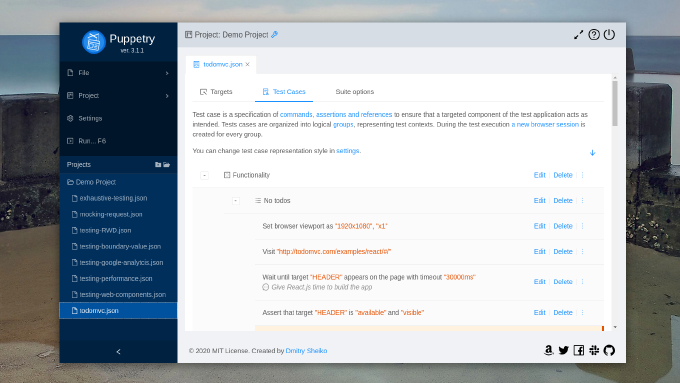
Nowadays nobody would argue the importance of automated testing. Yet end-to-end tests are often hard to write and even harder to maintain. There are many solutions to help with it. Puppetry is a test constructor, which allows you building test suites without any coding. QA-engineer can record user scenario in a built-in browser, extend the generated test case with browser commands and assertions, manage the suite structure (like drag’n’drop) and run tests. Puppetry translates Gherkins-styled test specification into a Jest/Puppeteer project, executes it and shows the report. This project can be simply plugged in CI/CD pipeline.
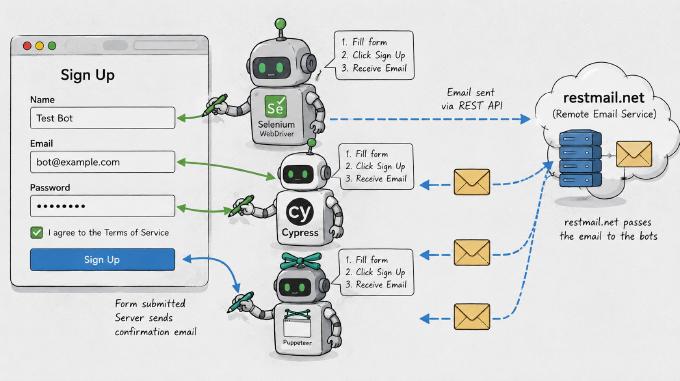
Most functional testing flows are straightforward. But when transactional emails are part of the flow (signup confirmations, password resets, purchase notifications), things get trickier. Your test tool needs to read the email, parse it, and follow the activation link.
In this article we look at testing a user signup flow with email confirmation using three tools: Selenium WebDriver, Cypress and Puppetry.
Eventually Puppetry 2.0 was released. The development took for a while, yet it contains a lot of changes. In fact the branch 1.x was basically a GUI for Puppeteer/Jest, but the tool grew up into a fully-fledged testing environment. Now Puppetry has a built-in templating engine, which supports environment-dependent variables and expressions, what brings a great potential. Just consider: you have test/stage service, which never resets. The only way to test, let’s say, signup flow is to create a new (no-yet-existing) user account. Now we can refer from our test cases to a variable...
A sound application architecture doesnt resist to changes, but welcomes them. Yet it still doesnt guarantee that the code is unbroken after we implement new features, making fixes or refactoring. Here we run automated tests to ensure that the app integrity didnt suffer. So we write unit-tests to check if separate objects, methods, functions work property independently. With integration tests we ensure they play as designed together. Eventually we create system tests to find out if the entire system meets our business requirements. The last one is also known as E2E testing and covers different aspects such functionality, GUI/Usability, security performance. As for functional testing I have already published a few articles sharing my experience with such tools as Nightmare and Zombie.js. They both provide nice programming experience, but still have their drawbacks. Then I asked myself what could serve me better? What I need is an execution environment accessible from both command-line interface and in a browser. Thus I can run the tests during CI (e.g. by Jenkins), but still use interactive mode while debugging the tests. Besides I prefer to have access to the latest features emerging with evergreen browsers. That makes me think of Headless Chrome. Does it have a Node.js API? It turned out it does. The library is called Puppeteer and its truly amazing. Below we are going to examine it by writing a test suite for an RWD demo app with a form.
Modern application get complex, we cannot go without automated testing. The canonical agile testing quadrants are split to technology-facing and business-facing tests. As for technology-facing testing I believe nowadays everybody has dealt with unit-tests. Thus we make sure that the smallest parts of the system act as intended in isolation. Also we use component tests to verify the behavior of large parts of the system and integration tests to check if communication between object isnt broken. The entire quadrant is all about programmer low-level tests proving that the code meets all the design requirements. These tests are meant to control internal quality, to minimizes technical debt, and to inform dev-team members of a problem of early stages.
Business-facing (or acceptance) tests describe the system in non-programming terms and they ignore the component architecture of the system. Here we know testing techniques such as functional, story-based, prototypes, simulations. Apparently in web-development the most demanded approach is end-to-end testing. This one is performed on the application level and tests whether the business requirements are met regardless of app internal architecture, dependencies, data integrity and such. Actually we make the test runner to follow the end-user flows and assert they get the intended experience.
Automated testing is an essential part of application life-cycle (see Continuous Integration). In web-development we usually test: Back-end (*Unit-tests), Front-end (HTML/CSS validators, JSLint/JSHint, CSSLint, YSlow etc) and UI (functional testing). Unit-testing (Back-end, Front-end) is about checking if all the application components adhere the technical design requirements. Every unit-test simulates the application environment on which runs. Functional tests are to determine if the application as a whole ecosystem has no flaws. They run on a copy of real application environment and show if everything is ok from user prospective. You can see it as an automation of QA-engineer routine where it is possible. For functional testing widely used such frameworks as Selenium, Windmill, Twill, BusterJS. Though, if you use qUnit for front-end unit-testing, you may love the idea to use the same tool on functional testing. jQuery provides an incredible API for DOM manipulation. It can be amazing tool to simulate user behaviors and check DOM reaction.
When testing a web-site, nevermind who you are developer or QA-engineer, it happens to you pretty often to fill-in form fields again and again. Boring, stupid work, but how to make sure the form does still work as intended? Some fields added, CAPTCHA was attached, whatever else done –you have to run the test again. Besides, it will be repeated on different browsers. Browser form auto-completion feature helps a bit, but that is not the same as when you have various sets of test-data always ready to apply on a form, isn’t it?