Contents
When Hooks came out with React 16.8 in 2019, I didn’t expect we’d really switch to functional components. A lot of my code simply couldn’t move to functions without losing flexibility and maintainability. Then the ecosystem caught up. Ant Design 4, for one, rebuilt its Form around hooks in 2020. Here are a few tricks I found while refactoring the old class-based code.
The old object-oriented approach#
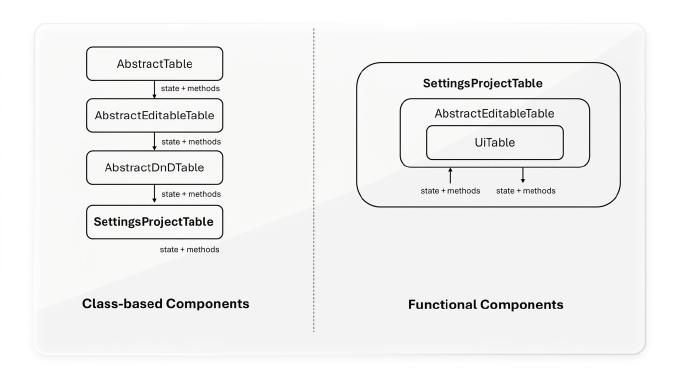
I used to follow a classic object-oriented design. All table components inherited from AbstractTable, directly or through derivatives like AbstractEditableTable and AbstractDnDTable. AbstractTable handled the core table features: sorting, filtering and pagination through a REST API client. AbstractEditableTable added inline editing, and AbstractDnDTable added drag-and-drop rows.
The concrete table components stayed thin, yet you could customize them at every level. For example:
AbstractTable.js
export default class AbstractTable extends React.Component {
  //...
  renderActions = ( text, record ) => (
	<a href="#" onClick={ () => this.removeRecord( record.id ) }>Delete</a>
  )

 removeRecord( id ) {
    this.api.remove( id );
    this.fetch();
  }
  //...

}
SettingsProjectTable.js
export default class SettingsProjectTable extends AbstractTable {

  constructor( props ) {
    super( props );
    this.api = api;
    this.state = {
      columns: [{
        title: "Name",
        dataIndex: "name",
        sorter: true
      },
      {
        title: "Actions",
        key: "action",
        render: this.renderActions
      }]
    }
  }

};
(By the way, removeRecord() doesn’t wait for api.remove(), so fetch() can return before the record is actually gone, and the row stays on screen. An await on both fixes it.)
Most tables had a column with row actions. The default renderActions() in AbstractTable renders a link that removes the row. A table without actions just leaves the column out. Common cases reuse the default, and special cases override it with their own render function, which still has access to the methods of AbstractTable (or any other parent class):
SettingsProjectTable.js
	renderActions = ( text, record ) => (
		<span>
		  <Link to={ `${ this.url }/${ record.id }` }>Edit</Link>
		  <Divider type="vertical" />
		  <Popconfirm placement="topRight" title="Are you sure to delete this record?"
			onConfirm={ () => this.removeRecord( record.id ) } okText="Yes" cancelText="No">
			<a href="#">Delete</a>
		  </Popconfirm>
		</span>
  )
removeRecord() is in the same scope, so calling it is trivial. Hooking into the lifecycle is just as easy, we override componentDidMount():
SettingsProjectTable.js
	async componentDidMount() {
		await super.componentDidMount();
		// extra functionality
	}
Moving to functional components#
With functional components we go for composition over inheritance. Instead of extending AbstractTable, AbstractEditableTable and AbstractDnDTable, we split the functionality into separate components. Passing state from a parent to a child is easy. But what about the other direction?
Take FooTable, which relies on UiTable for the base table functionality. Handing column metadata from FooTable to UiTable is simple. A custom render function for row actions is another story, because it needs UiTable methods like removeRecord(). That’s what useImperativeHandle is for:
UiTable.js
import React, { forwardRef, useImperativeHandle } from "react";

const UiTable = forwardRef(({ columns, api, baseUrl, prefetchedData }, ref ) => {

	// Expose method to the the calling component
    useImperativeHandle( ref, () => {
        return {
            removeRecord
        };
    }, []);

	return <>...</>;

});

export default UiTable;
FooTable.js
import { useRef } from "react";

export default function FooTable( props )  {

  const ref = useRef( null ),
	    columns = [
		   ...OTHER_COLUMNS,
			  {
				title: "Actions",
				key: "action",
				width: "120px",
				render: renderActions
			  }
		];

	function renderActions( text, record ) {
		return (
			<span>
			  <Popconfirm placement="topRight" title="Are you sure to delete this record?"
				onConfirm={ () => ref.current.removeRecord( record.id ) } okText="Yes" cancelText="No">
				<a href="#">Delete</a>
			  </Popconfirm>
			</span>
		);
	}

  return <UiTable columns={ columns } api={ api }  ref={ ref } { ...props } />;

};
useImperativeHandle exposes methods of the child component, and the parent reaches them through ref. Note that renderActions is a function declaration on purpose. columns refers to it before the line where it’s defined, and only declarations are hoisted. An arrow function in a const would throw a ReferenceError there.
Two things to watch. The empty dependency array in useImperativeHandle is fine as long as removeRecord() doesn’t read state. If it does (the current page, the filters), list that state in the dependencies, or the parent ends up calling a stale version. And since React 19, a function component gets ref as a regular prop, so forwardRef isn’t needed anymore.
What about overriding? A function component has no methods to override. Instead, the child accepts a customization function through props and falls back to its own default:
UiTable.js
const UiTable = forwardRef(({ columns, api, baseUrl, prefetchedData, footer = null }, ref ) => {

	const renderFooter = footer ?? ( () => {
		// render the default footer
	} );
});
The parentheses around the arrow function are required. footer ?? () => {} without them is a syntax error.
Forms: a function as children#
Forms were the next challenge. I wanted to keep a common UiForm for the base functionality. UiForm wraps Ant Design’s Form and takes care of validation, submission and data fetching. An Ant Design form is built like this:
<Form { ...config } >
    <Form.Item
      label="Name"
      name="name"
      rules={[]}
    >
      <Input />
    </Form.Item>
	<Form.Item
      label="Email"
      name="email"
      rules={[]}
    >
      <Input />
    </Form.Item>
	...
</Form>
In our case <Form> belongs to UiForm, while the <Form.Item> fields are specific to each form, like FooForm. So FooForm passes a function as children, and UiForm calls it with whatever the fields need from its scope (the render props pattern):
UiForm.js
export default function UiForm({ children }) {
	// ...
	const onKeyDown = () => {
		// ...
	},
	[ initialValuesLoaded, setInitialValuesLoaded ] = useState( false );

	return <Form form={ form }
            layout="vertical"
            initialValues={ initialValues }
            scrollToFirstError={ true }
            onFinish={ ( values ) => {
              setLoading( false );
              submit( pkInt, values );
            }}
            onFinishFailed={ () => setDisabled( true )  }
          >
            { errorMessage ? <Alert
                 description={ errorMessage }
                 type="error"
               /> : null }

            { children({ form, onKeyDown, initialValuesLoaded }) }


          </Form>;
}
FooForm.js
export default function FooForm({ api }) {
	// ...

	const generateSlug = ( form ) => {
		const src = form.getFieldValue( "title" );
		src && form.setFieldValue( "slug", normalizeSlug( src ) );
	 }

	return <UiForm { ...config }>

     {({ onKeyDown, form, initialValuesLoaded }) => ( <>
          <FormItem  label="Title"  name="title">
              <Input onKeyDown={ onKeyDown } />
          </FormItem>

		  <FormItem label="Slug"  name="slug"
			  extra={<a onClick={ () => generateSlug( form ) }>Generate from the name</a>}>
              <Input  onKeyDown={ onKeyDown }  />
          </FormItem>
	  </> )}

	  </UiForm>;
}
FooForm gets the Ant Design form instance (form) and with it the whole Form API, which is how “Generate from the name” fills in the slug. It also gets the shared onKeyDown handler for its inputs.
Did we lose anything?#
Not really. Composition, useImperativeHandle and customization through functions cover what inheritance used to do, and the dependencies are more explicit: FooTable names what it takes from UiTable instead of inheriting everything. The one part I’d use sparingly is the ref. The React docs themselves say to use refs only for imperative behavior you can’t express as props. So if I were starting from scratch, I’d build on props and render functions, as UiForm does, and keep refs for the few places where the parent really has to call into the child.