Contents
While reading State of HTML 2026 I noticed that Browser AI APIs are already in use quite a bit. Are they good enough for real things, though? The models run on the user’s device, so there’s no API key and no bill per call. It’s free, at least for now. That brought back the customer support inbox we handled in PrestaShop many years ago. If we had to build something like that today, what could Browser AI APIs add to it?
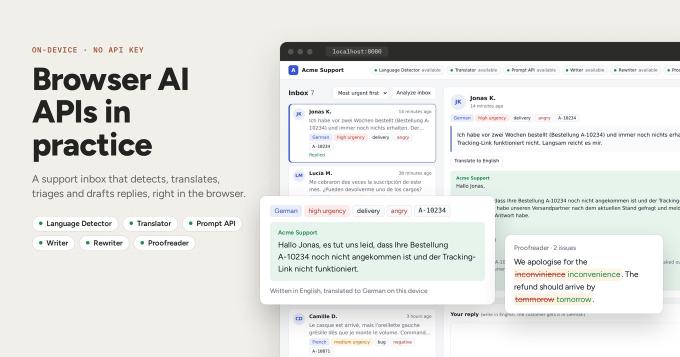
So I built a demo, Acme Support. It’s a mock inbox with a few customer comments in German, Spanish, Japanese, Ukrainian, French and English. When the page loads, Language Detector puts a language badge on every comment. Then the Prompt API tags each one with urgency, category, sentiment and the order number, if there is one.

That happens on page load only when the models are already on the device. On the first visit Chrome has to download them, and it starts a download only after a user click. So the first thing you get is a “Download models” button.
The selected comment opens on the right. “Translate to English” runs it through Translator, right in the browser:

Under the comment there’s a reply form. The agent writes in English and the customer gets the reply in their own language. The more interesting part is here. “Draft it” makes Writer read the comment and suggest a reply:

If you’d rather write the reply yourself, pick a style in the dropdown and click “Rewrite”. Rewriter makes your text more formal, friendlier, shorter or longer.

“Check” runs Proofreader. It shows every mistake with a fix next to it, and you apply the fixes one by one or all at once.

The source code is on GitHub.
How it works in code#
All of these APIs work the same way. You ask availability(), call create(), then use the instance. Here it is with Language Detector:
await LanguageDetector.availability();
// "available", "downloadable", "downloading" or "unavailable"

const detector = await LanguageDetector.create({
  monitor( m ) {
    m.addEventListener( "downloadprogress", ( e ) => console.info( `${ Math.round( e.loaded * 100 ) }%` ) );
  }
});
If "LanguageDetector" in self is false, the browser doesn’t have the API at all. Browsers ship these APIs one by one, so you check each of them on its own. In my Chrome, Language Detector and Translator work out of the box, while Writer, Rewriter and Proofreader still need flags.
downloadable means the model isn’t on the device yet. create() starts the download, but only with user activation. So the click handler of “Download models” calls create() for every API right away, without awaiting anything first. The monitor callback gets e.loaded as a fraction from 0 to 1, and the demo shows it as a percentage on each status chip.
Creating an instance takes time, so the demo creates each one once and caches the promise (not the instance) in a Map. That way two quick clicks share one create().
Detecting and translating#
Take Jonas’s comment. It’s in German, so first we detect the language:
const [ top ] = await detector.detect( comment.text );
top.detectedLanguage; // "de"
detect() returns a list of { detectedLanguage, confidence } sorted by confidence. When the top one is below 0.5, the demo shows “Unknown language”. I put Tom’s “ok” in the inbox to check exactly that, since two letters is hardly enough to tell a language.
For the badge you don’t need a lookup table of language names. Intl.DisplayNames already has them:
new Intl.DisplayNames([ "en" ], { type: "language" }).of( "de" ); // "German"
Now the translation:
const translator = await Translator.create({ sourceLanguage: "de", targetLanguage: "en" });

await translator.translate( "Ich habe vor zwei Wochen bestellt (Bestellung A-10234) und immer noch nichts erhalten. "
  + "Der Tracking-Link funktioniert nicht. Langsam reicht es mir." );
// "I ordered two weeks ago (order A-10234) and still received nothing. The tracking link doesn't work. I've had enough."
You get one translator per language pair, and each pair is a separate download. A support team knows which languages it serves, so the demo prepares German, Spanish, Japanese, Ukrainian and French, in both directions.
Triage with the Prompt API#
Detector and Translator each do one job. For urgency and category we need the Prompt API (LanguageModel), which talks to Gemini Nano directly. To get an answer the app can use, I give it a system prompt with the rules and pass a JSON Schema as responseConstraint:
const session = await LanguageModel.create({
  expectedInputs: [{ type: "text", languages: [ "en" ] }],
  expectedOutputs: [{ type: "text", languages: [ "en" ] }],
  initialPrompts: [{
    role: "system",
    content: "You triage customer support comments for Acme, an online store that sells home electronics. "
      + "Urgency is high when the customer lost money or cannot use the product, "
      + "medium when something is broken but there is a workaround, low otherwise. "
      + "orderId is an order number mentioned in the comment, or null."
  }]
});

const schema = {
  type: "object",
  properties: {
    sentiment: { type: "string", enum: [ "positive", "neutral", "negative", "angry" ] },
    category: { type: "string", enum: [ "billing", "delivery", "bug", "feature-request", "praise", "other" ] },
    urgency: { type: "string", enum: [ "low", "medium", "high" ] },
    orderId: { type: [ "string", "null" ] }
  },
  required: [ "sentiment", "category", "urgency", "orderId" ],
  additionalProperties: false
};

const raw = await session.prompt( `Customer comment:\n"""\n${ englishText }\n"""`, { responseConstraint: schema });
JSON.parse( raw );
// { sentiment: "negative", category: "delivery", urgency: "high", orderId: "A-10234" }
The model gets the English translation, not the German original. Nano supports only a few languages and does best in English, and we have the translation anyway. The schema guarantees valid JSON in the right shape. Whether the category is right is another matter, so I treat these badges as hints.
What if we triage the whole inbox in one session? Every prompt() adds to the session context, so the seventh comment would be judged with the previous six still in it. The demo creates the base session once, runs each comment through session.clone() (which keeps only the system prompt) and calls destroy() on the clone when it’s done.
Drafting, rewriting, proofreading#
“Draft it” asks Writer for a first version:
const writer = await Writer.create({
  tone: "neutral",
  length: "short",
  format: "plain-text",
  sharedContext: "Replies from the Acme customer support team to customers. "
    + "Do not promise refunds, discounts or delivery dates. Sign as Acme Support.",
  outputLanguage: "en"
});

const stream = writer.writeStreaming(
  "Write a reply to Jonas K., who left the customer comment given as context. "
    + "Category: delivery. Urgency: high. Order: A-10234.",
  { context: `Customer comment: ${ englishText }` }
);

for await ( const chunk of stream ) {
  textarea.value += chunk;
}
Here the APIs start feeding each other. The task is built from the triage result, and the context is the translated comment. The draft in the screenshot above kept to sharedContext and didn’t promise a delivery date. It also opens with a bare “Jonas K.,” which no person would write. I’d use Writer for a first draft and never send its output without someone reading it.
Tone and length are fixed at create(), so a different tone means another instance. Same with Rewriter:
const rewriter = await Rewriter.create({ tone: "more-formal", format: "plain-text", outputLanguage: "en" });

textarea.value = await rewriter.rewrite( textarea.value );
Each preset in the dropdown is a separate rewriter with its own tone (more-formal, more-casual) or length (shorter, longer), created the first time someone picks it.
Rewriter could fix the typos too. Why Proofreader then? Rewriter hands back new text. Proofreader tells you what’s wrong and where:
const proofreader = await Proofreader.create({ expectedInputLanguages: [ "en" ] });

const { correctedInput, corrections } = await proofreader.proofread( textarea.value );
// corrections: [{ startIndex, endIndex, correction }, ...]
With the indices the demo renders each mistake struck through with the fix next to it, and the agent picks the fixes they agree with. Applying a fix changes the text length, though, so every correction after it has to shift its indices. “Fix all” gets around that by applying corrections from the last one to the first.
Finally, “Send in German” runs Translator in the other direction:
const back = await Translator.create({ sourceLanguage: "en", targetLanguage: "de" });

await back.translate( textarea.value );
The agent never left English, and Jonas gets the reply in German.
Running it yourself#
Language Detector and Translator are stable since Chrome 138, and the Prompt API is available to web pages since Chrome 148. Writer, Rewriter and Proofreader are still experimental, so on your own machine you enable them in chrome://flags (#writer-api, #rewriter-api, #proofreader-api) and relaunch Chrome. Flag names have changed between versions before. If one is missing, search the page for the API name.

Flags don’t help visitors of a public site, of course. There you register your origin for the origin trials and add the tokens to the page.
Gemini Nano also wants a decent machine: Windows 10/11, macOS 13+, Linux or ChromeOS on a Chromebook Plus, about 22 GB of free disk and an unmetered connection for the first download. If an API says unavailable and you don’t know why, check chrome://on-device-internals. It shows whether the model is actually there.
The APIs need a secure context, and localhost counts as one, so any static server will do:
python3 -m http.server 8080
Recap#
So can Browser AI APIs do real work? For a support inbox, mostly yes. All six follow the same availability(), create(), call pattern, and each does one small job. Language Detector and Translator are the part I’d trust. They’re stable, and the translations were good enough to work with. The Prompt API with a JSON Schema gives you structured triage, but I’d still leave the final call on urgency to a person. Writer, Rewriter and Proofreader make the agent faster. None of them should send anything on their own.
What I like most is that customer messages, with their order numbers and complaints, never leave the browser. The price is the setup: desktop Chrome, a big first download, and flags or origin trial tokens for half of the APIs. For an internal tool, where you control the machines, I’d use it today. For a public site I’d keep a server fallback for everyone whose browser says unavailable.